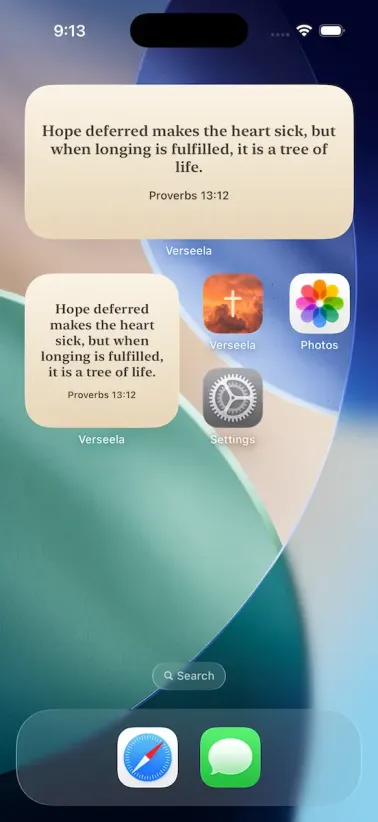
Why put a verse on your Home Screen
Most people unlock their phone dozens of times a day. That is a lot of small openings, and each one is a chance to read a line of scripture. A Bible verse widget fills that space with something worth reading, rather than another notification to clear away.
It also changes the shape of your day. Instead of remembering to open a reading app, the verse simply appears. Some people read it before they get out of bed. Some read it while the coffee brews. Some read it in the school run or on the drive into work. The point is not the number of times you read. The point is that reading happens at all.
Because the widget rotates through your verse feed, you meet more than one passage across a single day. The verse changes as the hours pass, so it stays fresh instead of becoming wallpaper you stop seeing.
God is our refuge and strength, a very present help in trouble.
Psalms 46:1, King James VersionWhat the Verseela widget shows you
The widget draws from the same calm feed as the app: daily Bible verses, Christian quotes, short prayers, and affirmations. You choose which kinds of content you want to see in the widget, so it can hold scripture only, or a mix that fits the moment.
The widget updates every hour. That rhythm is deliberate. A verse that changes hourly gives you something new to read without giving you a reason to check again and again. It is a quiet nudge, and it is built to stay out of your way.
You can also pick the size and the style that suits your screen, and you can match the widget to your device theme so it looks at home in light mode or dark mode.
How to add the widget on iPhone
Adding a widget to your Home Screen takes a few seconds once you know where to look.
Touch and hold an empty space on your Home Screen until the icons begin to jiggle.
Tap the Edit button in the top corner, then tap Add Widget.
Scroll down to the Verseela app and tap it.
Swipe left or right to choose a size, then tap Add Widget.
Tap Done to finish.
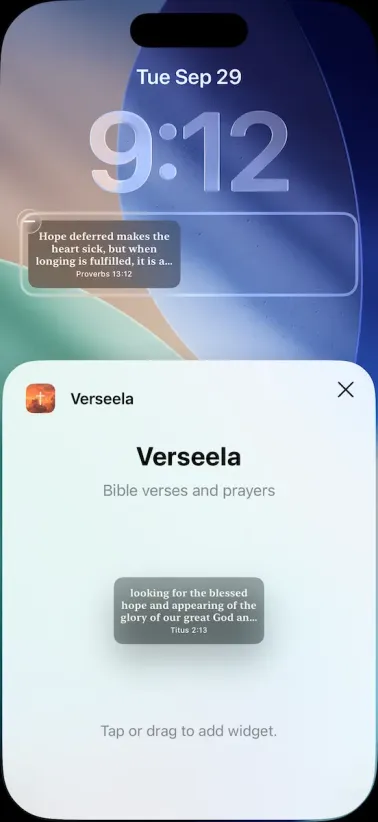
On your Lock Screen, the steps are similar. Touch and hold your Lock Screen, tap Edit, then tap Add Widget. Choose Verseela, pick the size you like, and tap Add. Lock Screen widgets let you pick the font and colour style that suit you.
How to add the widget on Android
Android names things a little differently, but the result is the same.
Touch and hold an empty spot on your home screen until the menu appears.
Tap Widgets.
Scroll to Verseela and tap the widget preview.
Drag the widget to the place on your home screen where you want it.
Lift your finger to drop it in place.
Some Android launchers keep widgets inside a separate widget drawer. If you do not see the option, open your app drawer and look for a widgets button or a three dot menu with a widgets entry.
A verse for the start of the day
The widget works well on its own, but it pairs even better with the daily prayers inside the app. Read a prayer when you have a quiet moment in the morning, then let the widget carry the verse through the rest of the day.
On harder mornings, keep a passage within reach rather than looking one up. The widget does that quietly, all day, without asking anything of you.
The Verseela home page shows the rest of what the app includes, including daily prayers, favorites, and reminders that fit around your day.